
КАТЕГОРИИ:
Архитектура-(3434)Астрономия-(809)Биология-(7483)Биотехнологии-(1457)Военное дело-(14632)Высокие технологии-(1363)География-(913)Геология-(1438)Государство-(451)Демография-(1065)Дом-(47672)Журналистика и СМИ-(912)Изобретательство-(14524)Иностранные языки-(4268)Информатика-(17799)Искусство-(1338)История-(13644)Компьютеры-(11121)Косметика-(55)Кулинария-(373)Культура-(8427)Лингвистика-(374)Литература-(1642)Маркетинг-(23702)Математика-(16968)Машиностроение-(1700)Медицина-(12668)Менеджмент-(24684)Механика-(15423)Науковедение-(506)Образование-(11852)Охрана труда-(3308)Педагогика-(5571)Полиграфия-(1312)Политика-(7869)Право-(5454)Приборостроение-(1369)Программирование-(2801)Производство-(97182)Промышленность-(8706)Психология-(18388)Религия-(3217)Связь-(10668)Сельское хозяйство-(299)Социология-(6455)Спорт-(42831)Строительство-(4793)Торговля-(5050)Транспорт-(2929)Туризм-(1568)Физика-(3942)Философия-(17015)Финансы-(26596)Химия-(22929)Экология-(12095)Экономика-(9961)Электроника-(8441)Электротехника-(4623)Энергетика-(12629)Юриспруденция-(1492)Ядерная техника-(1748)
Primary sheave eng
|
|
|
|
Do not remove the nut (clutch carrier) yet

NOTE:
 Loosen the nut (clutch carrier) one turn using the lock- nut wrench Ø while holding the clutch carrier with the rotor holding

| Rotor holder: 90890-01235 | |
| Lock-nut wrench: 90890-01348 |
V-  BELT, CLUTCH AND SECONDARY/
3. 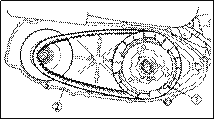 Remove:
• Clutch assembly Ø
• V-belt Ø
NOTE:
Remove the V-belt from the primary sheave side with clutch assembly
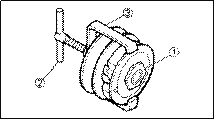 SECONDARY SHEAVE DISASSEMBLY
1. Remove:
• Nut Ø (secondary sheave)
NOTE:
Loosen the nut Ø while attaching the clutch spring compressor Ø and clutch spring holder arm Ø and release the compressed spring after removing the nut

|

 CLUTCH INSPECTION
1. Measure:
• Clutch shoe thickness
 If scratched, glaze using coarse sandpaper If worn or damaged, replace
| Clutch shoe thickness: 2.0 mm | |
| <Limit:1.5mm> |
NOTE:
After using the sandpaper, clean off the polished par- ticles
Check the other clutch shoes Replace the three as a set
|
|
|
|
|
Дата добавления: 2014-12-23; Просмотров: 443; Нарушение авторских прав?; Мы поможем в написании вашей работы!